Imagine reaching the checkout counter at Walgreens with a basket of everyday essentials, a few personal-care products, or an over-the-counter medication. Instead of taking out a physical debit
Imagine reaching the checkout counter at Walgreens with a basket of everyday essentials, a few personal-care products, or an over-the-counter medication. Instead of taking out a physical debit or credit card, you want to use your iPhone or Apple Watch. The question is simple: does Walgreens take Apple Pay, and can you complete the purchase with a quick contactless payment?
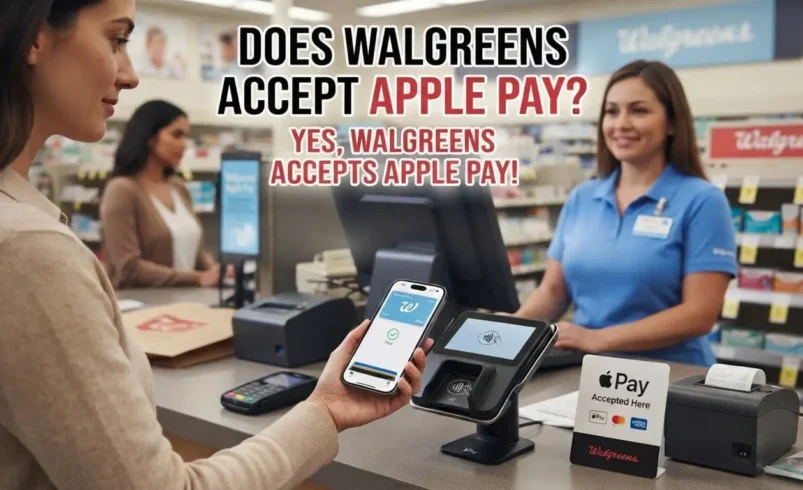
Yes. Walgreens accepts Apple Pay at its U.S. retail stores. The retailer also confirms that Apple Pay is accepted on Walgreens.com and in its mobile app. One important exception is online Walgreens Photo purchases, for which Apple Pay is not accepted. Payment options can also differ depending on whether an order is shipped, collected in store, or handled through a pharmacy counter. <Cite refs={[“turn600006search0″,”turn600006search6”]} />
This makes Apple Pay a convenient option for many Walgreens customers, particularly those who prefer not to carry a physical payment card. However, knowing where it works is just as important as knowing that the retailer accepts it. A normal store purchase, a prescription pickup, an online shopping order, and a Photo purchase may follow different checkout processes.
This guide explains how Walgreens contactless payment works, how to use an iPhone or Apple Watch at the register, what pharmacy customers should know, and what to do if Apple Pay is declined. It also covers online shopping, alternative payment methods, rewards, and practical security considerations.
Quick Payment Information Table
Fact
Details
Retailer
Walgreens
Primary Keyword
Does Walgreens Take Apple Pay
Apple Pay In-Store
Yes, at participating U.S. store checkout terminals
Contactless Payments
Supported, including Apple Pay and other select contactless options
iPhone Payments
Supported through Apple Wallet
Apple Watch Payments
Supported at compatible contactless terminals
Pharmacy Purchases
Available for eligible payments at supported store checkout terminals
Walgreens App
Apple Pay is listed as an accepted payment option
Walgreens.com
Apple Pay is listed as an accepted online payment option
Photo Orders Online
Apple Pay is not accepted for online Photo purchases
Alternative Payments
Credit cards, debit cards, cash, checks, gift cards, and other accepted methods
Main Requirement
Compatible Apple device with an eligible payment card configured in Apple Wallet
The Short Answer: Does Walgreens Take Apple Pay?
Walgreens accepts Apple Pay at its U.S. retail stores. Customers can use a compatible iPhone or Apple Watch at a checkout terminal that supports contactless payments. Instead of inserting a physical card, they authenticate the transaction on their device and hold it near the reader.
The retailer also lists Apple Pay among its accepted payment options for online shopping and its mobile app. Its official payment information specifically excludes online Photo purchases, so customers ordering prints, cards, or other photo products should check the payment methods available for that particular order. <Cite refs={[“turn600006search0”]} />
The distinction between a store and an online checkout is important. In-store acceptance does not automatically mean that every service, special order, or payment arrangement uses the same process. Prescription pickup, shipped orders, and Photo purchases can involve different checkout arrangements.
For an ordinary retail purchase, however, Apple Pay is a supported Walgreens payment option. If the contactless reader is working and the card in Apple Wallet is eligible, customers can generally complete the transaction without handing over a physical card.
Paying at Walgreens With an iPhone: How the Checkout Works
Using an iPhone at Walgreens is straightforward once Apple Pay has been configured. First-time users should prepare their device before reaching the register so they can complete the payment without holding up the checkout line.
Before Reaching the Checkout
Start by opening the Wallet app on your iPhone. If you have not added a payment card, select the option to add a debit or credit card and follow the on-screen instructions. You may need to scan the card or enter its details manually. Your bank or card issuer may then request additional verification before allowing the card to be used.
Not every card is automatically eligible. Apple Pay requires a supported card from a participating issuer, and the bank may need to approve its addition to the Wallet. If the setup process displays a verification request, complete it before trying to pay at Walgreens.
Once the card is ready, check which payment method is set as your default. You can keep one card selected for ordinary purchases and choose another at checkout when necessary. It is also sensible to make sure your phone has enough battery power for the shopping trip.
Apple Pay is Apple’s digital wallet and contactless payment service. Its general operation is explained in the Apple Pay overview, while Apple’s own instructions provide the most useful guidance for device setup and payment steps.
At the Payment Terminal
When the cashier has entered your purchase total, wait for the payment terminal to display its contactless payment prompt. On a compatible iPhone with Face ID, double-click the side button to bring up the default payment card. Authenticate using Face ID or your device passcode when requested.
If your iPhone uses Touch ID, the authentication process may involve the Home button and fingerprint recognition. The exact interaction depends on the device model and its settings.
After authentication, hold the top of the iPhone close to the contactless reader. Keep it in position until the terminal processes the payment. You should not need to press the phone against the reader; simply bringing it close enough for contactless communication is generally sufficient.
If you want to use a different card, select it in Wallet before presenting the phone. This is useful when you separate personal and household expenses or use different cards for different types of purchases.
After Payment Is Approved
Once the payment is accepted, your iPhone should display a confirmation, usually showing a checkmark and the word “Done.” The terminal may also display an approval message or print a receipt, depending on the checkout process.
You can review the transaction later through Wallet’s transaction information, although the level of detail available may depend on the card issuer. Your bank or card provider may also show the completed purchase in its own app or account statement.
If the terminal does not confirm the payment, do not immediately tap repeatedly. Check whether the register has recorded the transaction, and ask the cashier whether it was approved or declined. This helps avoid confusion if a payment is still processing.
Can You Use Apple Pay at Walgreens Pharmacy?
Yes. Apple Pay can be used for eligible pharmacy-counter purchases when the Walgreens checkout terminal accepts contactless payments. This can be useful when collecting a prescription and paying a copayment, buying over-the-counter medication, or purchasing other pharmacy-related products.
However, pharmacy transactions can involve more than one process. A prescription may first need to be checked against insurance coverage, pricing rules, or other requirements. The payment collected at the counter is a separate part of the transaction. Apple Pay can handle an eligible payment, but it does not replace prescription processing or determine what an insurance plan covers.
For example, a customer collecting a prescription may have an insurance copayment to pay. Once the prescription has been processed and the amount due is confirmed, the customer can ask whether contactless payment is available at the counter. If the terminal supports Apple Pay, the customer can authenticate and complete the payment in the usual way.
The same general principle applies to eligible over-the-counter products purchased at the pharmacy counter. The key consideration is whether the transaction is being processed through a compatible payment terminal.
Some prescription orders are arranged for pickup, while others are shipped or handled through a separate payment process. Walgreens explains that prescription pickup orders are paid for at the store, whereas shipped orders may be paid online. Therefore, customers should distinguish between collecting a prescription at a physical location and paying for an order through an online account. <Cite refs={[“turn397190view0”]} />
If a pharmacy payment involves insurance, a prescription benefit card, or another specialized arrangement, ask the pharmacy team which payment methods apply before completing the transaction.
Does Walgreens Accept Apple Pay Through Its App and Website?
Walgreens supports Apple Pay beyond its physical checkout counters. Its official payment information confirms acceptance on the website and in the mobile app, with a specific exception for online Photo purchases. The available payment method should still be checked during the checkout process because different order types may have different requirements.
In-Store Purchases
At participating retail checkout terminals, customers can use Apple Pay with an iPhone or Apple Watch. This applies to eligible purchases processed through the store’s contactless payment system.
The customer does not need to open the Walgreens app simply to make an ordinary contactless payment. Apple Wallet handles the payment card and authentication, while the Walgreens register processes the purchase.
Walgreens Mobile App
Walgreens lists Apple Pay as an accepted payment method in its mobile app. Customers shopping through the app should look for the Apple Pay option when they reach the payment stage. If it appears, they can select it and follow the device’s authentication instructions.
The app can also be used for shopping, prescription-related tasks, savings, and order pickup. However, the payment process may depend on the type of order and the service selected. A customer should not assume that every pharmacy, delivery, or special order follows precisely the same checkout flow.
Walgreens.com Orders
Walgreens.com also lists Apple Pay as an accepted online payment option. When it is available, customers can select it at checkout and confirm the transaction using their compatible Apple device.
Apple’s general online payment process requires selecting the Apple Pay button or payment option, reviewing the payment details, and confirming the transaction. The device may request Face ID, Touch ID, or a passcode before the payment is completed.
Customers should pay attention to the final order summary. Check the delivery address, shipping details, items, and total before authorizing the payment.
Walgreens Photo Orders
Online Photo purchases are an important exception. Walgreens’ payment information states that Apple Pay is not accepted for Photo purchases paid for online. This means customers ordering prints, photo gifts, cards, or similar products through the online Photo service should review the payment options shown during checkout rather than expecting Apple Pay to appear.
A Photo order collected at a physical store may involve a different payment process from an online Photo order paid in advance. If the order is not paid online, ask the store which payment methods are available when collecting it.
Apple Watch at Walgreens: Can You Leave Your Phone Behind?
Yes. You can use an Apple Watch to pay at a compatible Walgreens contactless terminal, provided the watch has been configured with an eligible payment card.
Before shopping, open the Watch app on your paired iPhone or the Wallet app on the watch, depending on your setup, and add a supported debit or credit card. Complete any verification requested by the card issuer. The card must be ready for use before you reach the checkout counter.
At Walgreens, follow these steps:
Double-click the side button on your Apple Watch.
Your default payment card should appear.
If necessary, scroll to select another card.
Hold the watch display near the contactless payment reader.
Wait for the confirmation tap or sound indicating that the payment has been processed.
Apple’s payment instructions describe this same basic process for contactless purchases. <Cite refs={[“turn397190view4”]} />
You do not need to open the Walgreens app to use Apple Watch for a normal in-store contactless payment. The watch communicates with the reader through its payment hardware. However, it must have a supported card configured and enough battery power to operate.
If you plan to leave your iPhone at home, it is worth checking the watch’s payment setup before leaving. A card that has not completed verification may not be ready when you reach the register.
What Else Can You Use If Apple Pay Is Not Working?
Walgreens offers several alternatives if a contactless payment cannot be completed. Having another method available is useful when a device battery runs out, a card issuer declines a transaction, or a terminal temporarily stops responding.
Physical debit cards are a straightforward alternative. Customers can insert or swipe a card when the terminal supports the relevant method. Some cards also support contactless tap-to-pay without Apple Wallet.
Credit cards are another option. Walgreens lists major card networks, including Visa, Mastercard, Discover, and American Express, among its accepted store payment methods.
Cash and checks are also listed among Walgreens’ store payment options. Acceptance can depend on the transaction and applicable store procedures, so customers with unusual payment requirements should confirm with the location.
Walgreens gift cards can be used for eligible purchases in stores. Customers should check the balance before shopping if they plan to use one toward a larger transaction.
Online payment options can include debit and credit cards, PayPal, PayPal Credit, and Walgreens gift cards, depending on the order. These online methods are not necessarily identical to the payment choices available at a physical register. <Cite refs={[“turn397190view0”]} />
Other contactless methods, such as Google Pay and supported tap-to-pay cards, may also be available at Walgreens terminals. The retailer describes its contactless options as including Apple Pay, Google Pay, and contactless credit cards.
Keeping a physical card or another backup payment method in your wallet can prevent unnecessary delays. This is particularly helpful when you are shopping for an essential item or collecting a prescription and do not want a device issue to interrupt the purchase.
Why Might Apple Pay Be Declined at Walgreens?
Apple Pay not working at Walgreens does not automatically mean that the retailer has stopped accepting it. A declined payment can result from the card issuer, device configuration, terminal, or temporary processing conditions.
The Contactless Reader Is Not Responding
A payment terminal may be temporarily unavailable, incorrectly configured, or unable to read a contactless device. If the reader does not react when you hold your iPhone near it, check whether the contactless prompt is active.
Ask the cashier whether the terminal supports contactless payments and whether it is currently working. If necessary, try another register or use a physical card.
The Card Has a Problem
The card linked to Apple Wallet may have expired, been replaced, or been restricted by the issuer. A transaction can also be declined because of insufficient available funds, a credit limit, suspected fraud, or a bank security check.
Open Wallet to check whether the card appears active. If the bank has sent a security notification, follow its instructions or contact the issuer using an official number or app.
Apple Wallet Is Not Properly Configured
An incomplete card verification process can prevent a payment card from being used. The card issuer may require confirmation through a banking app, text message, or other authentication method.
An outdated device operating system can also cause problems with some features. Check for available updates and make sure the card is still listed correctly in Wallet. If a card was recently replaced, it may need to be added or verified again.
The Device Is Too Far From the Reader
Contactless payments rely on close-range communication. If the phone or watch is too far from the reader, the terminal may not detect it.
With an iPhone, hold the top portion near the contactless reader. With an Apple Watch, position the display close to the terminal. Keep the device there until you receive a clear confirmation.
A Temporary Network or Processing Issue
Payment systems sometimes experience temporary processing interruptions. A card issuer may be unavailable, the store terminal may lose its connection, or the payment network may experience a delay.
If a payment appears to be taking too long, ask the cashier to check its status before trying again. This helps prevent accidental duplicate attempts. If the transaction is declined, try another accepted payment method and check your bank account later to confirm whether any pending authorization appears.
Apple Pay vs. Physical Card at Walgreens
Both Apple Pay and physical cards can be practical ways to pay at Walgreens. The better option depends on the customer’s preferences, device availability, and the payment terminal.
Consideration
Apple Pay
Physical Card
Checkout method
Hold a compatible device near the reader
Insert, swipe, or tap if supported
Device requirement
Compatible iPhone or Apple Watch
No phone or watch required
Authentication
Device authentication and payment approval
May require PIN, signature, or other verification
Convenience
Useful for customers who carry an Apple device
Useful as a reliable backup
Payment record
Available through Wallet and card issuer
Available through the card issuer
Main limitation
Requires a configured device and eligible card
Requires the physical card to be available
Apple Pay can reduce the need to take a physical card out of a wallet, but it still uses an underlying debit or credit account. The card issuer must approve the transaction. A physical card can be useful when the device is unavailable, while Apple Pay may be preferable for people who regularly use their iPhone or watch for contactless purchases.
Neither method is guaranteed to work in every situation. A terminal problem or issuer restriction can affect both. Keeping a backup option available is sensible even if Apple Pay is your usual payment method.
Is Apple Pay Safe for Walgreens Purchases?
Apple Pay includes security features designed to protect payment information. When a supported card is added to Apple Wallet, the service uses a device-specific account number and transaction-specific security information rather than simply sending the original card number to the merchant in the usual payment flow.
Device authentication adds another layer. Depending on the iPhone or Apple Watch, a payment may require Face ID, Touch ID, a passcode, or the watch’s configured security process. This can make it more difficult for someone who does not have authorization to use the device to complete a payment.
However, no payment method should be treated as completely risk-free. Users still need to protect their devices, accounts, and banking information.
A few practical habits can help:
Use Face ID, Touch ID, or a strong passcode: Avoid leaving a device accessible without a screen lock.
Protect your Apple Account: Use strong account credentials and additional authentication where available.
Keep software updated: Updates may include security improvements and important fixes.
Use lost-device protections: If an iPhone or Apple Watch is lost, use Apple’s available device-management tools to protect it and suspend payment access where appropriate.
Monitor transactions: Review bank and Wallet activity and report unfamiliar charges to the card issuer.
Avoid suspicious requests: Never share passcodes or account verification codes with someone claiming to be a payment support representative.
The wider subject of digital payment security is part of modern consumer technology, where convenience and protection need to work together. Readers can also explore broader discussions of mobile technology and everyday payments to understand how digital tools are changing routine transactions.
Apple Pay can provide useful security protections, but users should still follow normal account and device-safety practices.
Helpful Tips Before Your Next Walgreens Visit
A little preparation can make an Apple Pay purchase easier. Before leaving home, check that the card you intend to use is active in Wallet and that any required bank verification has been completed. Make sure your iPhone or Apple Watch has sufficient battery power, especially if you plan to rely on it as your only payment method.
At the store, look for the contactless symbol on the payment terminal or ask the cashier whether tap-to-pay is available. If you are buying pharmacy items, remember that insurance processing and payment collection are separate steps. Confirm the amount due before presenting your device.
It is also worth checking your card’s available balance or credit. A correctly configured Apple Wallet cannot override a card issuer’s decision to decline a transaction. Keeping a physical card in your wallet gives you another option if the device or terminal has a problem.
For online orders, review the payment methods displayed at checkout. Walgreens supports Apple Pay online and in its app, but Photo purchases paid for online are an exception. Confirming the available option before submitting an order can prevent surprises.
A useful pre-shopping checklist includes:
Confirm that your payment card is active in Apple Wallet.
Charge your iPhone or Apple Watch.
Check your available balance or credit.
Look for the contactless payment symbol at the register.
Carry a physical payment method as a backup.
Review online checkout options for special orders and Photo purchases.
These small steps can help avoid delays, especially when you are making a quick purchase or collecting medication.
Frequently Asked Questions About Walgreens and Apple Pay
1. Does Walgreens take Apple Pay in all stores?
Walgreens lists Apple Pay among its accepted in-store payment methods and supports contactless payments at its U.S. retail locations. However, individual checkout terminals can experience temporary problems. If a particular reader does not respond, ask the cashier whether another terminal is available.
2. Can I use Apple Pay at Walgreens pharmacy?
Yes. Eligible pharmacy-counter payments can be made with Apple Pay when the terminal supports contactless transactions. The prescription must first be processed, and any insurance or benefit requirements must be handled separately from the payment itself.
3. Does Walgreens accept Apple Pay for prescriptions?
For prescriptions collected and paid for at a Walgreens store, Apple Pay can be used for an eligible payment at a supported terminal. Walgreens explains that prescription pickup orders are paid for at the store. Shipped prescription orders follow an online payment process, so check the options shown for that order.
4. Can I pay with my Apple Watch at Walgreens?
Yes. Add an eligible card to Apple Wallet on your watch, double-click the side button, select the payment card if needed, and hold the watch display near the contactless reader. Wait for the confirmation before moving away.
5. Does Walgreens accept Apple Pay online?
Yes. Walgreens lists Apple Pay as an accepted payment method for online purchases through Walgreens.com. The available options may depend on the order type, and online Photo purchases are excluded.
6. Can I use Apple Pay in the Walgreens app?
Yes. Walgreens’ official payment information states that Apple Pay is accepted in its app. Select it if it appears during checkout, then authenticate the payment using your compatible Apple device.
7. Does Walgreens Photo accept Apple Pay?
Walgreens does not accept Apple Pay for Photo purchases paid for online. Customers should check the payment methods displayed during the Photo checkout process. An order paid for at a physical store may follow a different process from one paid online.
8. Why is my Apple Pay being declined at Walgreens?
Possible causes include a declined card, insufficient funds, an issuer security check, incomplete Wallet verification, a device problem, or a temporary terminal or processing issue. Check Wallet and your bank app, confirm the reader is working, and try another accepted payment method if necessary.
9. Can I get cashback when using Apple Pay at Walgreens?
Do not assume that an Apple Pay purchase automatically qualifies for cash back at the register. Any cash-back offer depends on the card, account, retailer’s available transaction options, and applicable terms. Ask the cashier and check with your card issuer before relying on cash back.
10. Do I need Wi-Fi to use Apple Pay in a Walgreens store?
You generally do not need to connect your iPhone to Walgreens’ Wi-Fi to make a normal in-store contactless payment. The device communicates with the payment terminal at close range. However, initial card setup, verification, and some account or card updates may require an internet connection.
11. Can I use Apple Pay and a Walgreens rewards account in the same purchase?
These are separate functions. You can generally identify your myWalgreens account at checkout using the available membership or rewards process, then pay using Apple Pay if the terminal supports it. Follow the cashier’s instructions or the prompts on the register so your rewards information is applied before payment.
12. What payment methods can I use if Apple Pay is unavailable?
Walgreens lists physical debit and credit cards, cash, checks, gift cards, and other accepted methods for in-store purchases. Online orders may offer cards, PayPal, PayPal Credit, and Walgreens gift cards. The available methods depend on the type of purchase and checkout process.
Conclusion – Is Apple Pay a Convenient Choice at Walgreens?
So, does Walgreens take Apple Pay? Yes. Walgreens accepts Apple Pay at its U.S. retail checkout terminals and also lists it as an accepted payment method on Walgreens.com and in its mobile app. For customers who prefer contactless payments, it offers a convenient way to complete eligible purchases using an iPhone or Apple Watch.
The main qualification concerns the type of transaction. Online Walgreens Photo purchases do not accept Apple Pay, and pharmacy pickup, shipped prescriptions, and other specialized orders may follow different payment arrangements. Customers should check the payment options for their specific order rather than assuming that every Walgreens service uses the same checkout process.
Before visiting, make sure your payment card is active in Apple Wallet, your device is charged, and you have another payment method available if needed. With those simple preparations, Apple Pay can be a practical option for many everyday Walgreens purchases.