

Does CVS Take Apple Pay? Store and Online Guide
- November 17, 2026
- 0
Does CVS take Apple Pay? Yes. CVS accepts Apple Pay at its physical U.S. store locations through compatible contactless payment terminals. Customers can use an eligible debit or
Does CVS take Apple Pay? Yes. CVS accepts Apple Pay at its physical U.S. store locations through compatible contactless payment terminals. Customers can use an eligible debit or
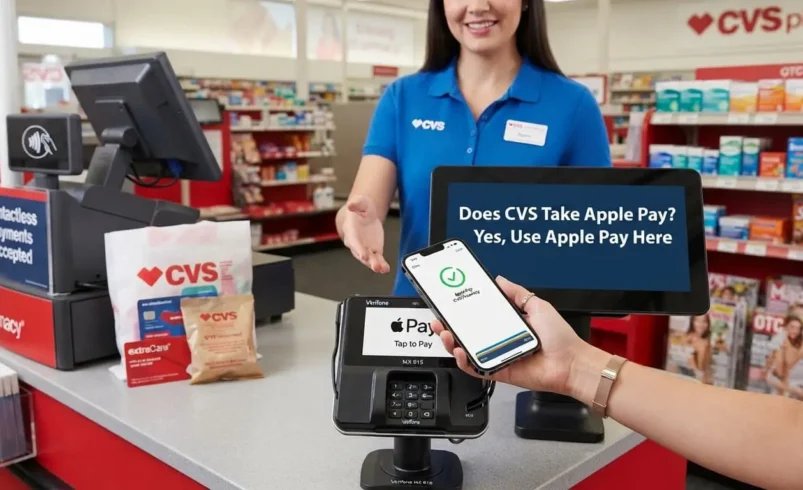
Does CVS take Apple Pay? Yes. CVS accepts Apple Pay at its physical U.S. store locations through compatible contactless payment terminals. Customers can use an eligible debit or credit card stored in Apple Wallet and complete an in-person purchase with an iPhone or Apple Watch. This includes compatible staffed checkout counters and self-checkout machines.
However, there is an important difference between shopping inside a CVS store and placing an order online. CVS’s published payment policy for standard nonprescription orders on CVS.com lists major U.S.-issued credit cards and qualifying debit cards, but it does not list Apple Pay as an accepted payment method. Customers should therefore not assume that a mobile wallet accepted at a physical register will also work for an online order or every feature in the CVS Pharmacy app.
Understanding this distinction can help shoppers avoid delays, particularly when purchasing everyday essentials, collecting prescriptions, or using ExtraCare discounts. The following guide explains where CVS Apple Pay works, how to complete a contactless transaction, and what to do if a payment does not go through.
| Fact | Details |
|---|---|
| Retailer | CVS Pharmacy |
| Apple Pay in physical stores | Accepted at supported contactless terminals |
| iPhone payments | Supported |
| Apple Watch payments | Supported |
| Self-checkout | Available at compatible terminals |
| CVS.com online checkout | Apple Pay is not listed as an accepted payment method for standard nonprescription orders |
| Payment technology | NFC contactless payment |
| Main requirement | An eligible card added to Apple Wallet |
Yes. CVS accepts Apple Pay at physical U.S. store locations equipped with compatible contactless payment terminals. Customers can use an iPhone or Apple Watch instead of inserting a physical debit or credit card, provided the card has been successfully added to Apple Wallet and is supported by its issuer.
The process is similar to paying with a contactless bank card. After the cashier enters the purchase total, the customer activates Apple Pay, authenticates the payment, and holds the device near the reader. The terminal communicates with the device to process the transaction. Once the payment is approved, the register provides a confirmation.
At a staffed checkout counter, look for the contactless payment symbol on the terminal. It usually resembles a small radio-wave icon. If you cannot see one, ask the cashier whether the register supports contactless payments before preparing your device.
It is worth remembering that payment acceptance and terminal availability are two different things. A retailer may support Apple Pay across its stores, but an individual checkout machine can temporarily be unavailable, undergoing maintenance, or configured differently. If the reader does not respond, ask the employee whether another terminal can accept contactless payments.
CVS’s acceptance of Apple Pay is particularly useful for shoppers buying ordinary retail products. Snacks, personal-care items, household essentials, and eligible healthcare products can generally be paid for through a supported in-store terminal. The same basic process applies whether the customer uses an iPhone or Apple Watch.
The key point is that Apple Pay is an in-person payment option, not a replacement for every CVS payment process. Pharmacy transactions, online orders, and special healthcare benefit arrangements can have additional requirements.
CVS self-checkout gives customers another way to complete purchases without waiting for a staffed register. At a compatible machine, Apple Pay can be used through the contactless reader just as it can at a traditional checkout counter.
The exact screen layout and payment prompts can vary between machines, but the general process is straightforward. First, scan each item and check that the products appear correctly on the screen. If a product requires age verification or employee assistance, follow the instructions displayed by the machine and wait for an associate when necessary.
When shopping is complete, select the payment option shown on the screen. The machine will display the available payment methods and indicate where to present a contactless card or device. If the terminal supports contactless payments, activate Apple Pay on your iPhone or Apple Watch and hold it near the reader.
Wait for the terminal to confirm the transaction. Do not remove your device too quickly or assume that the purchase has been completed simply because the payment interface appeared. Check the screen for an approval message and collect your receipt if one is offered.
Not every self-checkout machine necessarily has identical hardware or availability. A terminal may be temporarily unavailable, or a particular checkout configuration may not provide the contactless option. If you cannot find the reader or the machine does not respond, ask a CVS employee for help rather than repeatedly attempting the payment.
For customers who regularly shop at CVS, it is useful to have a backup payment method available. A physical debit or credit card can help complete the purchase if a self-checkout terminal is temporarily unable to process a mobile wallet transaction.
A CVS Pharmacy visit can involve more than ordinary retail shopping. Customers may collect prescriptions, purchase over-the-counter medicines, pay for eligible healthcare products, or complete transactions involving insurance and health benefit programs. Although Apple Pay can be used for eligible payments at supported in-store terminals, these different transactions should not be treated as identical.
Products such as pain relievers, allergy medicines, first-aid supplies, vitamins, and personal-care items are generally handled like other retail purchases. If the item can be purchased through the ordinary store checkout process, a supported contactless terminal can accept an eligible Apple Pay transaction.
However, an item’s healthcare purpose does not automatically determine how it must be paid for. Some products may qualify for a specific benefit program, while others may be ordinary retail purchases. The payment method and eligibility rules should be checked separately.
When collecting a prescription, the pharmacy must first complete the relevant prescription and insurance processing. This may involve checking coverage, confirming the amount owed, and addressing any requirements associated with the prescription.
Apple Pay can be used for an eligible payment when the pharmacy’s checkout terminal supports contactless payments. For example, if the prescription has been processed and the customer needs to pay an amount at the counter, they can ask whether Apple Pay is available for that transaction.
However, Apple Pay does not replace insurance processing or determine the amount of a copayment. It simply provides a way to make an eligible payment. Prescription restrictions, insurance arrangements, and pharmacy procedures remain separate.
Flexible Spending Account (FSA) and Health Savings Account (HSA) cards may be used for eligible healthcare expenses, depending on the account provider and the purchase. Some eligible cards can also be added to Apple Wallet, but this depends on the issuer and its digital wallet support.
Even when an FSA or HSA card is available in Apple Wallet, not every CVS purchase will qualify. The card issuer, benefit administrator, product eligibility rules, and transaction type determine whether the payment can be approved.
Customers should check their plan’s rules before relying on a healthcare benefit card for a purchase. If a transaction is declined, ask whether the product is eligible and whether the card supports the intended payment method.
Some insurance plans provide allowances for approved over-the-counter healthcare products. These benefits may use special cards or payment systems with restrictions on eligible products, participating retailers, and transaction amounts.
An OTC benefit card should not automatically be treated like an ordinary debit card. Even if it carries a familiar payment network logo, its acceptance may depend on the program’s rules and the retailer’s ability to process the eligible purchase.
If you plan to use an OTC allowance at CVS, check the benefit provider’s instructions and confirm that the products qualify. Apple Pay acceptance at a regular checkout terminal does not guarantee that every restricted healthcare benefit can be processed through the same digital wallet.
This is one of the most important distinctions for CVS customers. Apple Pay acceptance at physical stores does not mean that CVS supports it for every online transaction.
CVS’s published checkout policy for online and phone nonprescription orders identifies U.S.-issued Visa, Mastercard, Discover, and American Express cards as accepted payment methods. It also recognizes debit cards carrying a Visa or Mastercard symbol. Apple Pay is not listed as a standard payment option in that policy.
When placing a standard nonprescription order through CVS.com, customers should be prepared to enter eligible card details through the website’s checkout process. The published policy also requires the card identification or CVV number for orders placed online.
This differs from paying at a physical store. At a register, Apple Pay can transmit payment information through a contactless reader. Online checkout generally requires the payment methods and details supported by the website’s own payment system.
If Apple Pay is not displayed as an option during checkout, customers should select one of the payment methods listed by CVS instead. Adding a card to Apple Wallet does not automatically make it available as an online payment option on every retailer’s website.
The CVS Pharmacy app provides access to services such as prescription management, ExtraCare offers, digital coupons, and account information. However, the availability of these features should not be confused with support for Apple Pay as a standard payment method for online retail orders.
Customers using the app should check the payment options displayed for the particular transaction. A feature that allows someone to view a prescription, manage a refill, or access a digital rewards card does not necessarily use the same checkout process as purchasing ordinary merchandise.
CVS also has digital tools for accessing ExtraCare information. Customers can display their digital rewards card through the app and add it to Apple Wallet or Google Pay. This is a way to present loyalty information, not proof that the app accepts Apple Pay for every purchase.
Managing a prescription through the app is different from completing a retail purchase online. A customer may request a refill, check prescription status, or arrange pickup through the available pharmacy features. Payment arrangements depend on the specific prescription and the instructions shown during the process.
If the prescription is collected at a physical CVS pharmacy counter, ask which payment methods are available for the amount due. A supported contactless terminal may allow Apple Pay for an eligible in-person payment. If the transaction requires an online payment method, follow the options presented by CVS.
The safest approach is to treat each checkout separately. Do not assume that the availability of Apple Pay at a store register automatically extends to CVS.com, prescription management, delivery, or every app-based service.
If your payment card is already configured in Apple Wallet, using an iPhone at a CVS checkout is usually a quick process. It is helpful to prepare the device before reaching the register so that you do not need to complete card setup while other customers are waiting.
Follow these general steps:
The exact screen and authentication process can vary by iPhone model, software version, and Wallet settings. Apple’s official Apple Pay overview provides background on the service, while its device instructions explain the current payment process.
An Apple Watch offers another convenient way to pay at CVS. Customers do not need to take their iPhone out of their pocket or bag when using a compatible watch with a supported payment card.
Before visiting the store, make sure the card has been added to Apple Wallet on the watch and that any required issuer verification is complete. At the checkout terminal, double-click the side button on the Apple Watch. The default payment card should appear, and you can select another available card if necessary.
Hold the watch display close to the contactless reader. Keep it near the terminal until you feel a gentle tap or hear a confirmation sound indicating that the payment has been processed.
The watch must have the required payment card configured, and the checkout terminal must support contactless transactions. If the terminal does not respond, ask the cashier whether another reader is available or use a backup payment method.
This is particularly useful for quick purchases when carrying a phone is inconvenient. However, customers should still check the transaction confirmation before leaving the register.
Even when a retailer accepts Apple Pay, an individual payment can fail. The cause may involve the checkout terminal, the Apple device, the selected card, or the card issuer. Understanding these possibilities can help you solve the issue without unnecessarily changing your Wallet settings.
A checkout machine may not have an available contactless reader, or its contactless function may be temporarily unavailable. Look for the contactless symbol and ask an employee whether another terminal can process the payment.
A reader can occasionally fail to respond because of a technical issue or temporary interruption. If the terminal does not react when you present your device, ask the cashier to check the machine or restart the payment process through the normal checkout procedure.
Apple Pay requires the appropriate device authentication. If Face ID, Touch ID, or the passcode process has not been completed, the transaction may not proceed. Activate Wallet again and follow the authentication prompt.
A declined transaction may be caused by insufficient available funds, a spending restriction, an expired card, or a bank security check. Check your banking app or contact the card issuer if the decline continues.
Banks and card providers sometimes apply security controls to transactions they consider unusual. If the card works elsewhere but repeatedly fails at CVS, contact the issuer to ask whether a restriction is affecting the payment.
A card may not have completed its initial verification, or it may have been removed or suspended. Open Apple Wallet and check whether the card is available for use. If necessary, contact the issuer before attempting to add the card again.
Sometimes the device is not positioned close enough to the reader, or the payment process has not been activated correctly. Follow the on-screen prompts, hold the device near the reader, and wait for confirmation. Avoid making repeated attempts until the cashier confirms that the previous transaction was not approved.
Apple Pay is convenient, but it is not the only way to pay at CVS. Customers can use other payment methods depending on the store, purchase type, and applicable restrictions.
Cash remains a straightforward option for ordinary in-store purchases. It does not depend on a phone, payment app, or contactless reader. Customers who prefer cash should confirm that the checkout location can process their transaction normally.
Credit and debit cards are common alternatives. Physical cards can be inserted, swiped, or tapped depending on the terminal and card capabilities. The card issuer may apply its own transaction limits or security checks.
CVS gift cards can be used for eligible purchases at CVS Pharmacy stores. However, CVS’s published online shopping policy states that CVS gift cards are not accepted as payment for standard online orders. This is another example of why store and online payment rules should be checked separately.
Healthcare benefit cards, including qualifying FSA and HSA cards, may be accepted for eligible purchases. Their use depends on the account provider, product eligibility, and transaction requirements. Some OTC benefit cards have additional restrictions.
Digital payment options can also differ by checkout method. CVS has supported contactless payment services beyond Apple Pay, including Google Pay at compatible in-store terminals. Availability should still be confirmed at the specific register.
If you want to compare another pharmacy retailer’s payment arrangements, WorldMagazine’s guide to whether Walgreens takes Apple Pay explains how its store and online payment options differ.
Using Apple Pay does not mean you lose access to CVS ExtraCare savings. The important thing is to treat the rewards process and the payment process as separate parts of the checkout.
ExtraCare is CVS’s customer rewards program. Members can access eligible discounts, coupons, and ExtraBucks Rewards through their account. At a physical store, customers can present their ExtraCare card, use the digital card in the CVS app, or provide the phone number associated with their account.
The CVS app also allows members to display their digital ExtraCare card and add it to Apple Wallet or Google Pay. This can make it easier to present rewards information at checkout, but the digital loyalty card is not the same thing as an Apple Pay bank card.
Before paying, make sure the cashier or self-checkout machine has identified your ExtraCare account. Apply any eligible offers and check that the discounts appear in the purchase total. Once the rewards information has been processed, use Apple Pay to pay the remaining amount if the terminal supports it.
Customers should also check the receipt after completing the purchase. It can show whether applicable discounts were applied and whether an ExtraBucks reward was earned or redeemed.
Do not assume that Apple Pay automatically identifies your ExtraCare account. A payment card stored in Apple Wallet and a CVS loyalty account serve different purposes, even when both are accessed through the same device.
For customers who regularly use an iPhone or Apple Watch, Apple Pay can make in-store CVS purchases more convenient. It allows an eligible payment card to be used without taking the physical card out of a wallet. The contactless process can also reduce the number of steps required at the checkout terminal.
Device authentication provides another layer of control. Depending on the iPhone or Apple Watch, the user confirms a transaction through Face ID, Touch ID, a passcode, or the watch’s payment interface. This means that simply holding an inactive device near a terminal does not normally complete a payment.
Apple Pay also uses a security approach commonly described as tokenization. Instead of sharing the physical card number with the retailer in the same way as a traditional card transaction, the payment system uses a device-specific account number and transaction-specific security information. This helps reduce exposure of the original card details during supported payments.
However, no payment method should be treated as completely risk-free. Customers should protect their devices, use strong authentication settings, and contact their bank if they notice an unfamiliar transaction.
There are also situations in which a physical card remains useful. A contactless reader may be unavailable, a card may not be supported by Apple Pay, or a bank may decline a particular transaction. Online CVS orders also follow different payment rules.
The most practical approach is to use Apple Pay when it is available and keep another accepted payment method as a backup.
A little preparation can prevent unnecessary delays at the checkout. First, confirm that the payment card in Apple Wallet is active and has completed any required verification. A card that has not been approved by its issuer may appear in Wallet without being ready for use.
It is also sensible to keep your device charged. Apple Pay depends on a working device and its payment configuration, so a completely drained phone or watch can create problems when you reach the register.
If you are using self-checkout, look for the contactless symbol before beginning the payment process. Not every machine will necessarily have the same layout or current availability. If you are unsure, ask a CVS employee before scanning all your items.
For prescription purchases, check whether your payment involves an insurance copayment, an FSA or HSA card, or a restricted OTC benefit. These arrangements can have separate rules that ordinary Apple Pay acceptance does not override.
Finally, keep a physical debit or credit card available when possible. Having a backup does not make Apple Pay less useful; it simply gives you another way to complete a purchase if a terminal, device, or card issuer prevents the contactless transaction.
CVS supports Apple Pay at its physical U.S. store locations through compatible contactless terminals. However, an individual reader may be temporarily unavailable or may not offer the contactless option at a particular checkout. Look for the contactless symbol or ask an employee if you are unsure.
Yes, you can use Apple Pay at compatible CVS self-checkout machines. Scan your products, select the payment option, and present your authenticated iPhone or Apple Watch to the contactless reader. If the machine does not support or cannot process contactless payment, ask an employee for another checkout option.
Yes. An Apple Watch with an eligible card configured in Wallet can be used at a compatible CVS contactless terminal. Double-click the side button, select the card if necessary, and hold the watch near the reader until the transaction is confirmed.
Apple Pay may be used for eligible in-person prescription payments when the pharmacy checkout terminal supports contactless payments. However, prescription processing, insurance coverage, and copayment requirements are separate. Ask the pharmacy team whether your particular transaction can be paid through Apple Pay.
Apple Pay is not listed as a standard payment option in CVS’s published policy for online and phone nonprescription orders. CVS identifies major U.S.-issued credit cards and qualifying Visa- or Mastercard-branded debit cards instead. Check the payment options shown at checkout before submitting an order.
Do not assume that the CVS Pharmacy app accepts Apple Pay for every purchase. The app supports services such as prescription management and ExtraCare rewards, but these features do not automatically mean Apple Pay is available for online retail checkout. Follow the payment methods displayed for the specific transaction.
Yes. You can identify your ExtraCare account separately by presenting your physical card, digital card, or associated phone number. Once eligible discounts and rewards have been applied, use Apple Pay to pay the remaining amount if the terminal supports it.
First, check whether the terminal recorded or declined the transaction. Confirm that your device is authenticated and that the selected card is active. If the payment continues to fail, contact the card issuer or use another accepted payment method. Avoid repeatedly tapping before checking the transaction status.
CVS supports Google Pay at compatible physical store checkout terminals. Like Apple Pay, it is a contactless mobile payment option, and availability can depend on the terminal. Do not assume that in-store acceptance means Google Pay is also available for standard online checkout.
A continuous internet connection on your iPhone is not generally required for an ordinary in-store NFC payment once Apple Pay and the card have been properly configured. However, initial card setup, issuer verification, device services, or certain transaction checks may require connectivity. The bank and payment network must still authorize the transaction, so offline operation should not be treated as a guarantee that every payment will succeed.
So, does CVS take Apple Pay? Yes. Customers can use an eligible iPhone or Apple Watch to pay for in-store purchases at supported CVS contactless checkout terminals, including compatible self-checkout machines. The process is straightforward once the payment card has been added to Apple Wallet and authenticated.
The important limitation is online shopping. CVS’s published payment policy for standard nonprescription orders on CVS.com lists eligible credit and debit cards rather than Apple Pay. App-based services, prescription management, healthcare benefit payments, and ExtraCare rewards can also follow separate procedures.
For a smooth checkout, confirm that your card is ready, look for a contactless reader, and identify your ExtraCare account separately when using rewards. Keep a backup payment method available in case a terminal or card issuer prevents the transaction. Understanding the difference between in-store contactless payments and online checkout makes it easier to choose the right payment method for each CVS purchase.
For More Visits: Worldmagazine